
Getting your print files ready for marketing might sound like a small technical step, but it can make or break the final result of your printed materials. Imagine putting hours into designing a stunning brochure, poster, or book cover, only to find that the colors look dull or the text appears misaligned when printed. That small oversight can easily turn a professional project into an expensive disappointment. Whether you are an author working with a book publisher, a business owner preparing a catalog, or someone planning to publish your first masterpiece, understanding how to set up a marketing-ready print file setup is essential.
In today’s digital-first world, print still holds a powerful impact. A well-prepared print file ensures that what you see on your screen matches exactly what comes out of the press. It’s not just about pretty visuals, it’s about clarity, consistency, and credibility. You want your printed materials to speak for your brand even before someone reads a single word. When you say to yourself, “I’m ready to publish my book,” or “I want to share my story through a trusted ebook publisher,” your print files must already be fine-tuned for success. This guide will walk you through the process step by step, helping you create professional and marketing-ready print materials that capture attention and build trust.
1. Start with the Right Design Specifications
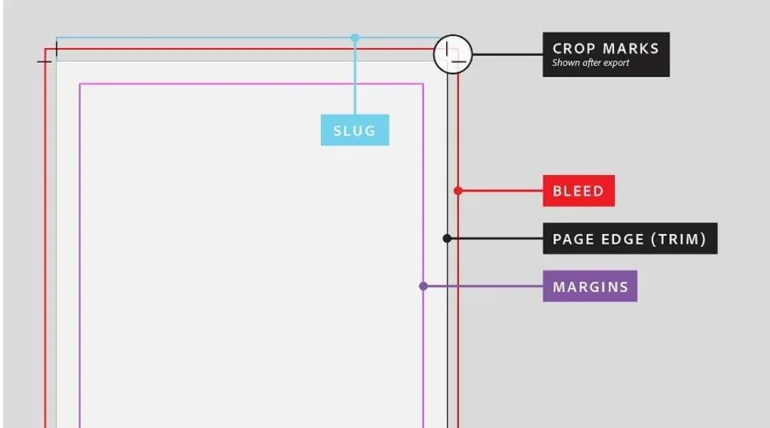
Every print project begins with setting up the right dimensions, bleed area, and resolution. These details are the foundation of a perfect print. Always work in the final size your printer or publisher requires, and ensure your resolution is at least 300 DPI for sharp and clean results. Including a bleed area helps avoid unwanted white borders after trimming, giving your materials a clean, professional look.
2. Marketing-Ready Print File Setup: Use the Correct Color Mode
One of the most common mistakes people make is designing in RGB instead of CMYK. Screens use RGB colors, while printers use CMYK. If your design remains in RGB, the final print may look darker or slightly off-tone. Converting to CMYK before finalizing your file ensures that your prints will match your expectations.
3. Choose the Right File Format
Always save your final print file in the right format to ensure smooth printing and consistent results. The most reliable format for most marketing materials is PDF because it keeps your layout, fonts, and images exactly as designed. When you export your file, make sure all fonts are embedded and all images are flattened to prevent unexpected changes or missing elements.
This guarantees that your design will look the same on every device and at every printing stage. For large visuals like banners or posters, you can also use TIFF files for their high-quality image retention. A book publisher, for example, values organized and properly formatted files because it saves time and maintains professional standards. When your file format is correct, you eliminate technical errors and ensure your print materials are truly marketing ready.
4. Pay Attention to Fonts and Images
Use high-resolution images to maintain quality. Avoid stretching images to fit because it can cause pixelation. When it comes to fonts, use no more than two or three complementary styles to keep your layout clean and readable. Make sure all text stays within the safe margin, so nothing gets cut off.
5. Review and Proof Before Printing
Before sending your file to print, always review everything carefully. Check alignment, spacing, spelling, and color balance. It’s smart to print a test copy at home or request a proof from your printer. This final step helps catch small errors that might otherwise cost time and money to fix later.
6. Prepare Files for Multiple Formats
If you plan to distribute your work both in print and digitally, prepare separate versions. For instance, if you decide to publish your book as both a printed copy and an ebook, your layout and formatting will need adjustments for each platform. Many ebook publisher platforms have different requirements, so double-check before submission to ensure your content looks perfect across all devices.
In the end, creating a marketing-ready print file setup is more than a technical requirement, it’s a creative process that bridges design and strategy. It ensures your work looks professional and communicates your message effectively. Whether you’re collaborating with a book publisher or planning to publish your own story, the quality of your print files reflects your brand. Take the time to set up your files properly, and you’ll see the difference in every page, poster, or catalog you share with the world.